Tablets are getting more varied, but there is still no tablet that does what Samsung’s Ultra series does. The Ultra line-up has always been about extremes; an extremely large tablet display paired with extreme performance and battery life—and this year’s Samsung Galaxy Tab S11 Ultra is no different.
However, in a year where Samsung has made significant changes to its smartphones, the Galaxy Tab S11 Ultra sticks out like a sore thumb with its very minimal updates. It is still very much a great device, but it is starting to feel that the company has reached the upper limits of what it can do with the Ultra series.
Design

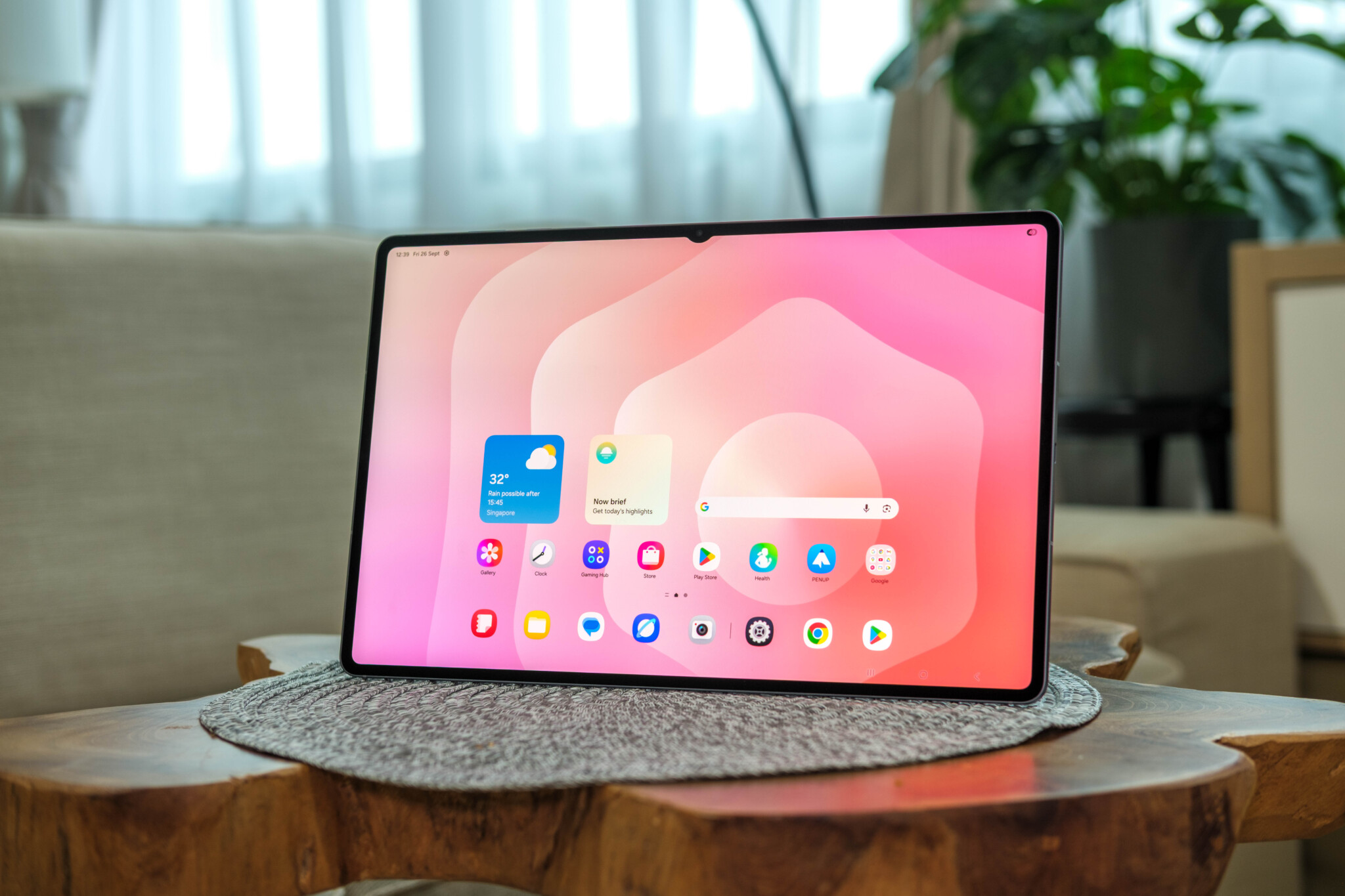
Don’t fix what ain’t broke, and that is the case with the. There aren’t any significant changes with the design of the device; it still has a comically large screen with slim bezels on the display. You will, however, notice that the notch is smaller here—this is because Samsung has opted to take out one of the cameras from the front screen.
Rather, the biggest change Samsung has made is in how thin it is. Like Samsung’s other recent devices, they’ve managed to slim down the tablet, this time shaving off 0.3mm and 26 grams from the tablet. The Tab Ultra has always been an unusually thin and light device for its size, and this decrease isn’t particularly noticeable when compared to its predecessor. Still, I continue to be amazed at how slim this tablet is. If you’re coming over from a laptop, the Galaxy Tab S11 Ultra’s portability is quite the game-changer; being able to fit into most backpacks and barely feeling its weight is refreshing to say the least.
That being said, while the Galaxy Tab S11 Ultra is the lightest the series has been, it still isn’t quite comfortable enough for one-handed use. The tablet still feels very unwieldy when holding it with one hand—it gets tiring on the hand after a short while, and it’s hard to find a good balance. It’s almost a necessity to get a Book Cover for the device just so it can be propped up and used easily, but that, of course, just adds more cost to an already pricey device.

Though the slimness of the device may make it seem like it would be flimsy, the aluminium body itself is reassuringly sturdy. Its IP68 water and dust resistance rating is also back, which means you can have a lovely TV show binge in the bath without worrying about it turning into a paperweight. All in all, you’re getting an ultra-premium experience when using the device.
Performance
The Samsung Galaxy Tab S11 Ultra still features the beautiful 14.6-inch AMOLED display, and with the 16:10 aspect ratio, it has been great for media consumption overall.
The display gets an upgraded 1,600 nits peak brightness, which makes the AMOLED panel pop off even more. Colours are fantastically vibrant on the screen, and the screen’s 2,960 x 1,848 resolution makes everything appear incredibly sharp and detailed. And since the notch has been minimised in this iteration, it has been less distracting whenever I’m watching an intense movie. Also, your enjoyment isn’t just limited to watching stuff, as the screen supports a refresh rate of up to 120Hz, so you can even admire how good it looks when just navigating through the menus.

Notably, the display also comes with an anti-glare coating and I’ve found that the experience of using the tablet outdoors has been perfectly comfortable, even when sunlight gets particularly harsh.
There’s a quad-speaker system packed into the tablet despite its slender body, and that amplifies the whole media-watching experience. The speakers are excellent – they get loud, sound crystal clear, and provide a satisfyingly decent amount of bass without being too overpowering.
But that’s not very different from what you can experience with its predecessor. So, what are the things that have been changed for the Samsung Galaxy Tab S11 Ultra?
Well, internally, the device is now equipped with the new Mediatek Dimensity 9400+ for its processor. It’s not a Snapdragon, but the chip does produce great performance on the tablet. Using the Tab S11 Ultra is a smooth experience, even during multitasking and gaming. Particularly for gaming, the device is able to run on high graphics presets while still achieving good frame rates during gameplay.
If you want to have the laptop experience, DeX mode runs similarly to previous Galaxy Tabs, but the introduction of One UI 8 does add new functionality into the mix. You can easily switch to the mode with a simple, quick downwards flick on an open app to change it to Windowed mode, where it now looks as if you are running it on a computer. And just like on PC, the device is able to run with several windowed apps.
We’ve seen this functionality before; it isn’t new. What’s different is how easily One UI 8 lets you set this up for future use. The update brings workspaces to the Galaxy Tab, and if you are familiar with the functionality on PC, it works much like that. Users who have particular apps that they use for work and personal use can set them up as separate workspaces, easily switching between them on the app manager screen when the situation calls for it. There’s a maximum of four workspaces you can customise on the tablet.

It’s a small addition that feels big when using it. I have work apps prepped on one workspace, but can seamlessly switch to my relaxed setup with media apps like YouTube and Spotify ready to go. The only nitpick I have—and it is a very tiny one—is that you can’t customise the name of each workspace. You can do it on PC, but this isn’t the case here. If you’re utilising all four workspaces, it would make it much easier to recognise which workspace is for what purpose.
Furthering the laptop replacement shouts, One UI 8 also now brings Extended Mode, which lets you extend the screen of the tablet onto an external monitor. If you use a dual-monitor setup, you know how much of a game-changer this is for productivity. Like with PCs, you can indicate the positioning of the tablet to the extended monitor, which allows users to drag and drop apps to and from each display. However, this is specific to DeX mode only; you can’t do this with apps while you are still in tablet mode.
The biggest change, however, isn’t on the tablet itself; it is with the S Pen accessory. Samsung has updated the S Pen with a new hexagonal design for the body, and the pen does feel more comfortable to hold and use while taking notes and doodling on the device. Writing with the S Pen also feels more precise and natural due to the new pen tip, which has been tweaked to be cone-shaped.

These are positive additions to the S Pen, but it does come with the caveat that there is no longer Bluetooth support on it. I was never a frequent user of air gestures and the like, so its absence isn’t necessarily a big loss, but there are some who will undoubtedly miss the functionality. On the flip side, you no longer have to worry about charging it—the S Pen now sits atop the edge of the Galaxy Tab S11 Ultra rather than at the back of the device, which was a better placement for it anyway.
Battery
The Samsung Galaxy Tab S11 Ultra gets a slight boost to its battery capacity—up to 11,600 mAh now (a 400 mAh increase). That massive battery goes a long way, delivering about 10 hours’ worth of mixed use (watching videos, browsing, and gaming) before dying, and that is with the brightness close to max.
While you won’t get charging speeds as high as other brands, the tablet does still support 45W fast wired charging, which gets it fully charged in just over 90 minutes. A quick 15-minute charge does get it back up to around 20% battery, which doesn’t sound like a lot, but it’s enough to last a couple of hours.
Verdict
There aren’t many changes on the Samsung Galaxy Tab S11 Ultra, so if you already have last year’s edition of the series, there is no need to upgrade. Especially considering how expensive these devices are. Most of the changes are all in software, and you’ll be able to experience them yourself once updates hit your system.
But if you’ve never tried the Ultra series before, this year’s iteration is the most fleshed-out one yet, bridging the gap between tablets and laptops even closer. The big, beautiful display, combined with its flexibility for multitasking, makes it a superb tablet for both work and casual use—and this is especially if you are looking for a laptop alternative. It’s really a unicorn of a device that provides an experience you can’t find anywhere else in the tablet world, and it looks as though Samsung will continue to be the only brand to give users the option of a premium tablet with a huge screen that can work as a laptop.
The Samsung Galaxy Tab S11 Ultra is available for purchase on the Samsung Online Store or via their official store pages on Shopee and Lazada.
Photos by Russell Loh of the DANAMIC Team.
Samsung Galaxy Tab S11 Ultra
Pros
- Gorgeous display
- Improved S Pen design
- More laptop-like functionality
Cons
- Minimal updates from its predecessor
- Expensive
Read us first on Google: add DANAMIC as a preferred source and our stories show up more in your Top Stories and AI results.