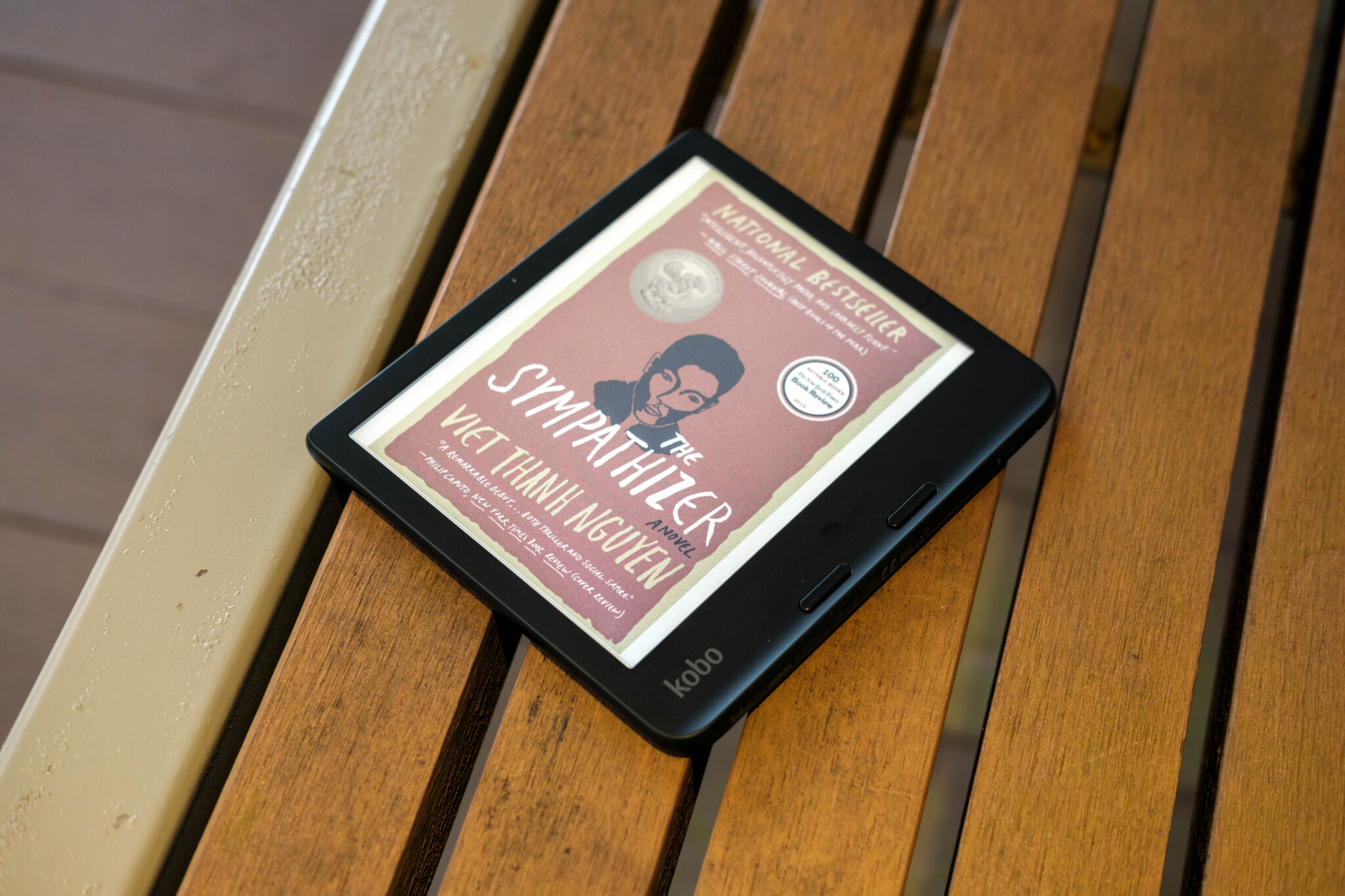
Recently, I’ve been attempting to get back into reading again. I was a voracious reader in my youth, but sadly haven’t touched a book in over a decade. But while I’m not quite in my book-tok phase yet, I’ve been quietly making progress with the help of my newest addition: the Kobo Libra Colour.
E-readers were something I was initially dismissive of due to their limited capabilities; I wasn’t too interested in getting something that would only output black and white. However, I’ve come to learn that my thinking is outdated. As it turns out, e-readers can do colour, though it was only recently that they became mainstream. You might even say that the Kobo Libra Colour’s release in 2024 was the big reason it did, since it was both portable and affordable.
Nearly two years on, the Kobo Libra Colour remains among the most compelling options for an e-reader, and it is clear to see why after my experience using the device. I’ve really enjoyed powering through some late-night reading with the e-book in hand. That being said, there are some quirks with it that keep it from being the perfect e-reader for everything.
Design and Build
Coming with a 7-inch screen, the Kobo Libra Colour is bigger than typical e-readers (which usually default to a 6-inch display). But it is wider as well. Kobo has stretched out one side to accommodate dedicated buttons for page turning.
It’s a feature you don’t often see for e-readers, but it really is something that should be the norm. With this little addition, it’s incredibly convenient to use the device one-handed. It’s given me more reason to read something even if I was in a particularly lazy mood. And it accommodates both right-handed and left-handed users as well; the UI auto-rotates to your desired orientation in a matter of seconds.

Despite the elongated width, the Libra Colour is still easy to hold. At 199.5 grams, the device is relatively lightweight, and additionally, there’s a slight curve on the edge to ensure it is easier to grip and hold while reading one-handed.
That being said, comfort could be slightly improved. Personally, I feel like the buttons are just a tad too far apart for my liking. My hand is a little on the small side, and I have to be quite deliberate in moving my finger just to turn a page. Usually, I would just rest my finger on the next page button to avoid this annoyance, but then it becomes slightly less balanced and is not as comfortable to hold. Plus, if I needed to refer to a previous page, I would have to re-adjust my hand position just to reach the top button.
Onto the build of the Kobo Libra Colour, this is quite the sturdy little e-reader! The shell of the Libra Colour is made out of plastic, but it doesn’t feel cheap. In fact, it is very robust in the hand—there’s not much give when trying to bend it, and it doesn’t ring hollow when I give it a knock. Kobo has also included a very nice textured finish on the back of the device, which adds a slightly premium touch.
But more than that, the Kobo Libra Colour is also IPX8-rated, meaning it can survive being submerged in 2-metre deep water for up to an hour. This means you can finally enjoy reading your favourite book while soaking in the tub, right? Well, yes. But it’s not quite the perfect experience. Just like with phones, the device does get jittery when there is too much water on its screen, so there’s that to be mindful of as well.

The Kobo Stylus 2 pen is an optional accessory that you can get alongside the Libra Colour for note-taking, and luckily, there are decently strong magnets that allow you to attach the stylus on the e-reader’s side. But it doesn’t hold well if you plan to chuck it into a bag; it’ll be better to purchase the stylus case so you can prevent the pen from getting lost.
The stylus itself feels very much like a regular pen, so it is comfortable to hold and use. The eraser function on the opposite end of the stylus and the highlighter button near the tip are also intuitive additions to the design, not unlike how you would use an eraser tip or highlighter.
Interface and Features
Though this was the first Kobo e-reader I’ve ever used, I found it easy to get started on the device. Kobo’s interface was pretty easy to figure out and navigate through. Everything is streamlined, and it does a good enough job of organising your books once you start downloading books onto it. It may not be as sleek as the Kindle—viewing your collection of books in your library looks better over there than here—but it gets the job done.
Since this uses E-ink technology, it obviously feels slower compared to a smartphone, but I am surprised by the responsiveness. Typing on the Kobo Libra Colour does not feel all that different compared to my phone! There are some quirks, however, like pressing and holding delete only removing one character at a time.
I do also appreciate that there are several ways to begin your book-reading journey on the device. The first, and the one Kobo obviously wants you to use, is to purchase e-books from the Kobo Store. There’s a decent selection of books, manga, and surprisingly, even light novels available in the store.
However, navigation can be an issue. It can be quite clunky trying to purchase multiple books from a series. There’s a related section in the store to find other books more easily, but they often aren’t organised chronologically for easy searching. Occasionally, you’ll also find multiple versions of the same book with different pricing, but the store does not elaborate on the differences between the two beyond the number of pages, total words, and publisher.

Besides the Kobo Store, the Libra Colour also lets you borrow from your local library. The Overdrive tab on the e-reader has the Libby app, which lets users access books from the National Library Board (NLB) in Singapore. It’s fairly simple to make an account and link to your preferred library, so you can pretty much start off reading quickly without needing to purchase anything. Your mileage will vary, however. Since this is based on whatever the library has in its stock, there is a chance that a book you are keen to read is not available for borrowing.
If that is the case, you can also add your own books to the device! You can link your Dropbox or Google Drive accounts to the Kobo Libra Colour and then download e-book files onto the device to begin reading. It’s been the primary way I’ve been adding to my collection.
The Libra Colour supports a good amount of file formats, but while it can read them, I’ve found the experience to be hit or miss. PDF is one of the supported formats, but you’re stuck with the font size while reading. And trying to zoom in felt like I was a baby attempting to lift weights—it was frustrating. And then there’s MOBI, which presented one of my books in this weirdly paragraphed mess that was distracting to read.

To get a good reading experience, EPUB seems to be the only consistent format on the Libra Colour. There’s a decent amount of customisability, allowing me to change the font type, size, thickness, and even the margins, with the e-reader dynamically changing the formatting.
And EPUB also works very well with the Kobo Stylus 2. It highlights words just like on a PC, and you can even add some personality by hand-writing some stuff onto it. Unfortunately, you don’t get this functionality with all the file formats. Writing and annotating do work on PDFs, but it is manual, so highlighting doesn’t appear as clean. Meanwhile, the CBZ and MOBI formats do not support the stylus at all.
Beyond annotating on e-books, you can make use of the Kobo Stylus 2 for personal notes as well. There’s a separate ‘My Notebook’ section where you can jot down anything, like a quick thought or a reminder that you don’t want to forget. Admittedly, it isn’t the best digital notebook around; the responsiveness is alright, but it can’t quite compare to something like an iPad. I’ve also noticed that the palm rejection is inconsistent, so sometimes notes get messed up.

It does have a few redeeming qualities, though. I like that the notebook feature can turn your handwriting to text, with it being fairly accurate in translating my handwriting properly. You can even draw diagrams on it if you’d like, though the presentation is quite basic. Overall, I would only use the notetaking feature for very quick notes, rather than have the Libra Colour be my main journal.
Audiobooks are also supported on the Libra Colour, though the device itself does not have any speakers equipped on it. To listen to the audiobooks, you’ll need to connect it to a Bluetooth audio device.
Reading performance
Reading on the Kobo Libra Colour is, surprise surprise, very good. With the E-ink technology and matte display, it does mimic the feeling of reading a physical book. Brightness on the Libra Colour is decent even during sunny conditions; I did not have too much trouble reading the screen when I brought the device outside. For people who prefer to read at night, there is also an auto natural light feature that adds a warmer tone to the display to prevent your eyes from being fatigued.
Of course, the big question is how well it fares for books with colour. And for that, you need to set your expectations accordingly.

It appears alright by itself, but have it next to a tablet and it is immediately evident that the Kobo Libra Colour does not look as good. While it may be using the latest Kaleido 3 E-ink technology, it still lags behind traditional LCD displays in terms of vibrancy. In truth, it brings its own charm; the muted colours combined with the display are reminiscent of a printed newspaper. So if you still covet the feeling of reading something physical, the Libra Colour still mimics that.
But if you’re intending to use Libra Colour to read media with colour, it may not be your best bet. In testing out the colour capabilities of the device, I’ve realised that the Libra Colour isn’t suited for certain mediums.
Comic books and graphic novels are, unfortunately, almost unreadable. The text is simply too small on the 7-inch screen, and it is too much of a hassle to constantly zoom in to read everything. Manga thankfully fares better, but there are still occasions where I need to squint to see what is being said in the dialogue.

Battery
As an e-reader, the Kobo Libra Colour does feature a long battery life despite the rather small 2050mAh capacity.
Kobo rates it for 40 days, but that is, of course, with specific conditions. I’ve used the device mostly at full brightness and found that it typically drains around 7% to 10% battery every hour of use—I only had to charge it after a week of use.
Unfortunately, it does not support fast charging, so it does take some time to fully get it back to speed. Annoyingly, there also isn’t an indicator to show whether or not the Libra Colour has finished charging if you are charging it when powered down.
Verdict
There’s a lot to like about the Kobo Libra Colour as an e-reader. The petite device is very easy to bring around, and the inclusion of the page-turning buttons is genuinely helpful for the reading experience. I also appreciate how open the device is, letting you borrow books through Libby or even bringing over your own stuff via Google Drive and Dropbox. And with the addition of the Kobo Stylus 2, you also get much more use out of it as a personal device.
But as a colour e-reader, it is limited. Colours aren’t as vibrant as you would expect, and some things like comic books—a medium where you would actually want to read in colour—don’t make for good reading on the device. For a similar price, you can find a tablet that does those better.
At the moment, I still feel that colour e-readers aren’t something to immediately jump on just yet. However, if you’re still keen to get an e-reader for the first time, the Kobo Libra Colour is priced quite competitively and is able to show off your book covers in all their glory.
Photos by Russell Matthew Loh of the DANAMIC Team.
Kobo Libra Colour
Pros
- Lightweight and portable e-reader
- Page-turning buttons adds convenience
- Flexibility in adding books to your library
- Kobo Stylus 2 brings additional functionality
Cons
- Colour tech still in the early stages
- Not the best for comic books or graphic novels
- Inconsistent file format reading
Read us first on Google: add DANAMIC as a preferred source and our stories show up more in your Top Stories and AI results.